The Roost design
Roost's visual identity is "an AI agent's home" — warm, calm, characterful, and not tied to any one
vendor. Everything is drawn with Android framework primitives: colors, gradients, Canvas, and
VectorDrawable. No raster assets, no bundled fonts.
The mascot
A tiny LED-eyed robot — a rounded-rect head, two glowing circular eyes, and a little antenna. It's a
single Canvas view (MascotView.kt): the eyes are filled circles over a soft RadialGradient glow. No
image files involved.
It's alive in two registers, both hand-animated on a Handler tick:
- Idle — a slow breathing rise-and-fall plus the occasional blink, so a docked phone still feels awake rather than frozen.
- Awake — a brighter pulse with the eyes widened, for when the agent is working.
The greeting and status line follow suit: they read one way when the agent is home and another when it's working, so the whole face reflects state, not just decoration.
Palette
A warm neutral base with one themeable accent.
| Token | Hex | Role |
|---|---|---|
| Dock black | #14110D | Background base (radial toward #1D1912) |
| Panel | #1C1813 | Cards / featured panel |
| Tile surface | #2A241C | Utility tiles |
| Text primary | #F3EEE4 | Warm cream text |
| Text muted | #A29A8C | Warm taupe |
| Accent | #E7A44E | Themeable (Honey default) |
The accent is owner-selectable in Settings — Honey, Slate (#7FA6C9), Sage (#93B98C), or
Violet (#B79BE0) — and recolors the mascot eyes, chips, glows, and the Store tile live. It also tints
monochrome icon glyphs (Simple Icons, Heroicons) on tiles, so they match the theme; full-color
icons — app and shortcut launcher icons, selfh.st logos — keep their real colors.
Health colors — a fixed semantic ramp
One thing the accent must not touch: outcome. When a control reports success or failure, the color has to mean success or failure — so a red-ish accent can't make "failed" read as fine. Roost keeps a small fixed semantic ramp, independent of the themeable accent, used by the HTTP action firing state machine and the presence/status work:
| Token | Hex | Meaning |
|---|---|---|
| Sage | #93B98C | success / queued (accepted) |
| Amber | #D98F3C | timeout |
| Clay | #CF6B5A | error |
These stay put whatever accent you pick.
Type
System families only — no bundled fonts:
- Greeting —
sans-serif, 21sp - Featured title —
sans-serif-medium, 18sp - Labels —
sans-serif, 13sp - Status line —
monospace, 12sp (e.g.roost · docked & charging · 87%, with real battery)
The featured hero card
The featured agent used to be one ringed tile in the grid. It's now a full-width hero card at the top of
the home surface: the agent app's real icon and name (pulled at render time via
PackageManager), with a small FEATURED pill. It reads as this device belongs to this agent without
Roost borrowing anyone's brand — the branding is the installed app's own.
Its card background is accent-tinted — a soft wash of your chosen accent — so the hero sits visibly apart from the uniform tile grid below it. It's the one surface on the home that isn't just another tile, and the tint says so.
The VPN chip
A small persistent chip shows the tunnel's live ↓/↑ rates. When a tunnel is up it turns Sage-green
(#93B98C) — a calm "connected" signal that sits apart from the themeable accent — while still ticking the
real transfer rates. It's a status readout, not a launcher tile.
The tile grid
Below the hero card, everything else on the home is one uniform grid of tiles. Favorite apps, web apps,
app shortcuts, Home Assistant scenes, and HTTP actions all render as the same tile —
no app-grid-vs-actions split, no section headers — with a Store tile at the tail for adding more. This is
ADR-0007,
formalized in SPEC-0004:
apps and web apps become ActionButtons through two read-only providers over the existing Favorites and
Web-Apps stores, ordered with everything else by a single layout — no config migration, and favorites are now
manually orderable too.
Its density is owner-selectable — slim list, regular cards, or a rich two-column grid, set in Settings → Appearance — and it's home-wide: every tile reshapes together.
Each tile carries a per-kind tagline so it reads at a glance: a web tile shows its host, an HTTP tile
METHOD · host, a shortcut "shortcut", an app just its name. A filter chip row — All plus a chip for
each kind present (Apps / Web / Shortcuts / HTTP / Scenes) — narrows the grid to a single kind; the active
filter persists, and which chips can appear is set under Launcher filters in Settings → Appearance.
Launch tiles stay quiet; fire tiles report. Tapping an app, web app, or shortcut just opens it — no
status line, no "tap to fire". Only fire tiles (HTTP actions and Home Assistant
scenes) report their whole firing lifecycle on the tile itself — no Toast, no popup you might miss from
across a dim room. It's a small Canvas disc driven by a Handler tick through a state machine:
- idle — resting.
- pending — a sweeping accent ring and "firing…" while the request is in flight; further taps are ignored (no double-fire).
- success — "done · 200 OK", briefly held, then decays back to idle. Drawn in Sage.
- queued — "accepted", for durable-task endpoints that take the work and return. Also Sage.
- error — sticky in Clay; tap to see why, then Re-fire or Dismiss.
- timeout — after 8s with no response, sticky in Amber.
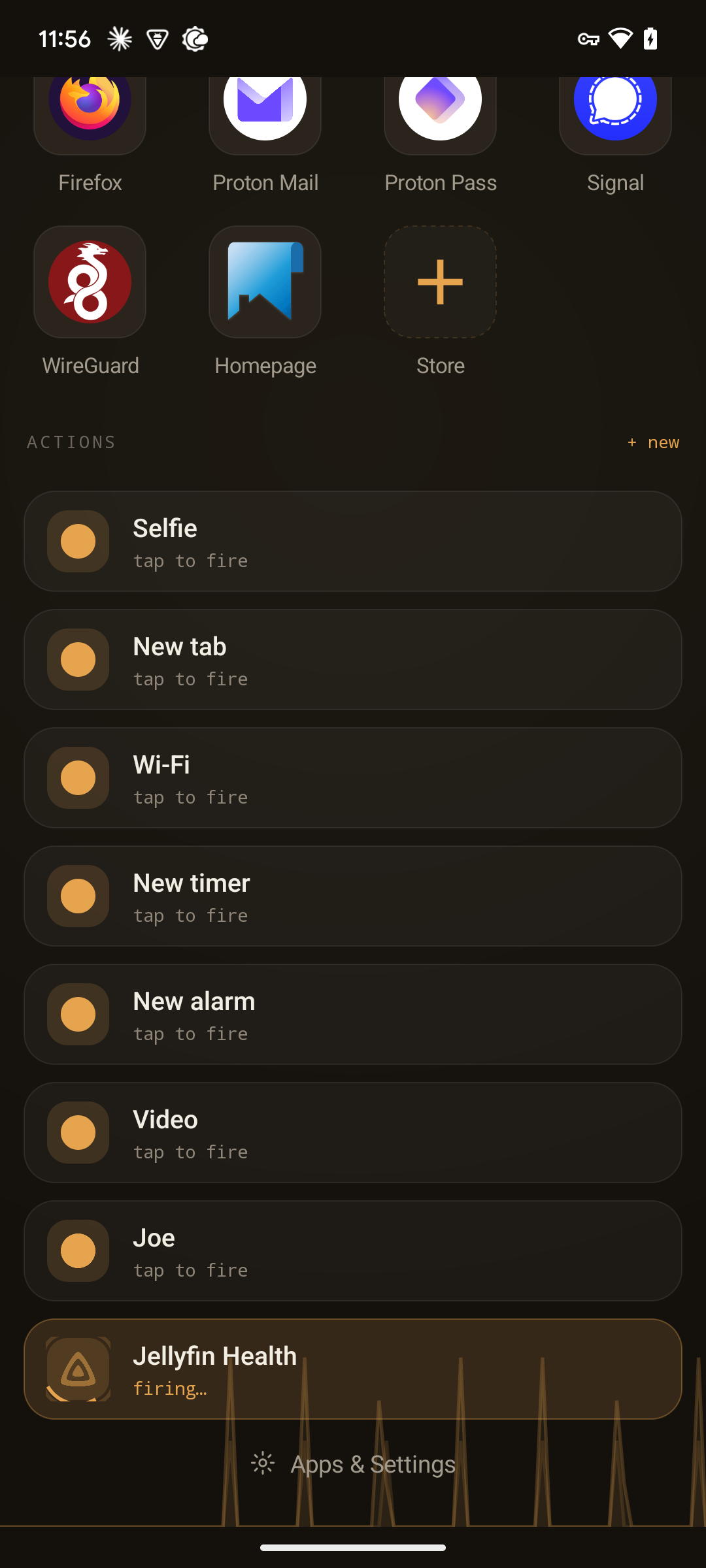
The health states use the fixed semantic ramp above, so an outcome never depends on which accent you chose.
Waking up
An optional waking-up boot sequence can play the first time Roost comes to the foreground: the mascot
over a short monospace boot log that fades in, like an appliance powering on. It's gated behind a
setting and off by default — pure Canvas and text, no assets.
The app icon
A little house with a glowing "resident" dot — home + presence in one adaptive VectorDrawable,
monochrome-friendly and vendor-neutral.
A cohesive device
Roost draws its own opaque dark home surface, but the OS wallpaper still shows through Recents and app-transition animations. The Match wallpaper to Roost action paints the same dock gradient as the wallpaper, so the whole device reads as one warm-dark habitat. It's applied once on first run and re-appliable from Settings.
Provenance
Roost's look came from a design handoff. The original brief lives in the repo at
docs/DESIGN-BRIEF.md.