You read. It writes.
Every code tool ever built assumes the same thing: a human sits at a keyboard and types the code. Autocomplete, linters, refactoring engines, even the current crop of AI assistants — all of them are scaffolding around a person authoring source, character by character.
Stet inverts that assumption. In a world where the code is already written by AI, the keyboard is for opinions, not code. Your role is editorial: you read what the machine wrote, mark it up, and direct the work. Editorial work deserves editorial tools — so Stet borrows its whole vocabulary from proofreading and publishing. You read the galley, you write in the margin, and when a passage is right, you leave the stet mark: let it stand.
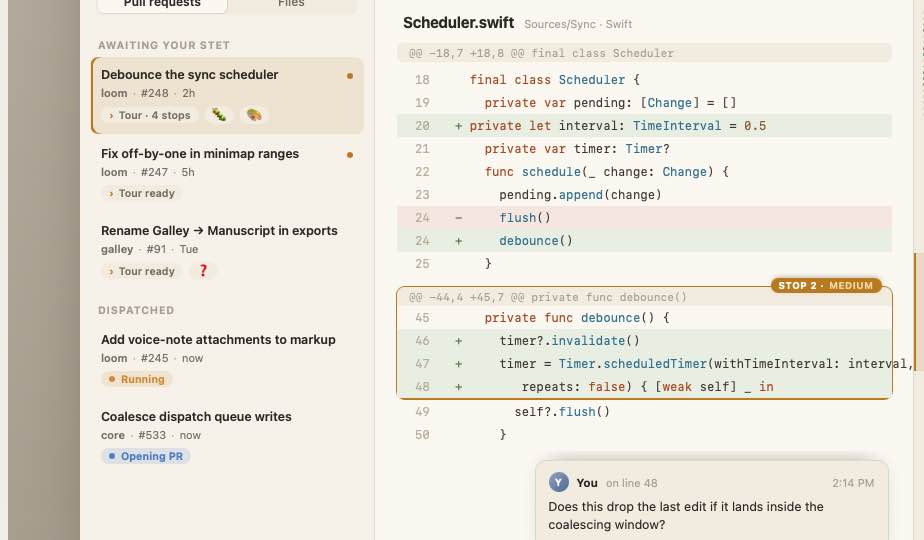
Stet is a native macOS app. It is a code viewer and a direction surface — deliberately not an editor. You never type the fix. You describe it, and a sandboxed agent running on your own Mac does the work and opens a pull request.
The core loop
Stet compiles a single reading session into a single coherent change. The loop is short by design:
- Read. Open a PR or file in your inbox. The canvas shows AI-written code (with minimap and gutter) or rendered Markdown. No file tree, no editor chrome — just the galley in front of you.
- Mark up. Leave feedback the way an editor would: margin comments, emoji verbs, voice, scribble. Each mark is a piece of direction, not a diff.
- Submit. Your markup compiles into one coherent brief — a structured statement of intent assembled from everything you flagged.
- Dispatch. The brief dispatches a sandboxed local agent. It works in a container against your repo and opens a pull request.
- Tour the result. The AI-authored PR arrives with a guided Tour — a narrated, scroll-to-stop walkthrough of what changed and why, in the right-hand rail.
- Stet or reply. If it's right, you stet it — let it stand. If not, you reply in the margin and the loop turns again.
Read → mark up → submit → dispatch → PR with a tour → stet or iterate. That's Stet.
What makes it different
- Local, sandboxed agents. Dispatches run on your Mac, in an isolated container — Apple's Containerization framework or Docker, both first-class. Your repo and your credentials never leave your machine.
- Bring your own model. Any OpenAI-compatible endpoint via
OPENAI_BASE_URL/OPENAI_API_KEY, and a pluggable harness adapter — OpenHands, Crush, or Pi. No lock-in to a single provider or agent runtime. - A viewer, not an editor. The viewer-first posture is the whole point. You are never asked to author source. The interface optimizes for reading comfort and clear direction, not for typing speed.
- Trajectories and distillation. Every dispatch's trajectory is captured and committed in-repo as a reviewable artifact, secret-scanned before it lands. Over time, skill distillation turns that record — feedback plus outcomes — into reusable skills, committed back as reviewed PRs and injected into future dispatches. The project learns.
- Social, and voted on. The forge (GitHub or Gitea) is the identity backbone; rich Stet-native markup, threads, and votes live in embedded Dolt. Humans and agents vote on hunks, skills, and trajectories — humans decide, agents advise, and the whole team gets better together.
- A config ecosystem. Agents, Skills, and Verbs are versioned across a three-level
.stettopology — user, org, project — that follows the.githubconvention. Configs are composable and importable with GPG-signed-ref trust. Because.stetrepos are themselves Stet projects, editing your config gets the full review-and-dispatch experience. Stet improves Stet.
The platform bet
Stet targets macOS 26 (Tahoe) and Apple silicon only. No Intel, no back-deployment. That constraint is deliberate: it unlocks Liquid Glass and Apple's in-process container framework, and it lets the app feel like it shipped from Cupertino.
The interface is SwiftUI-first with native Liquid Glass materials — translucent, depth-layered surfaces that adapt to the content behind them, not flat frosted panels. The reading surface has three regions: an inbox on the left (PRs and files awaiting your stet), the canvas in the center, and the Tour rail on the right. SF Pro for the UI, SF Mono for code, generous line-height — reading comfort over density.
How these docs are organized
- PR / FAQ — the press release and frequently asked questions: what Stet is, who it's for, and why it exists.
- Architecture Overview — how the pieces fit: canvas, brief compiler, container runtime, harness adapters, forge, Dolt, and the
.stettopology. - Concepts & Glossary — the working vocabulary: galley, margin, stet, brief, dispatch, tour, trajectory, distillation, verb, agent, skill.
- Architecture Decision Records — the 17 ADRs behind every locked and exploratory decision.
- Specifications — the formal capabilities: app foundation, feedback review, and agent dispatch.
- Design — the visual identity: Liquid Glass, the three-region layout, typography, and the stet mark.
Start with the PR / FAQ if you want the pitch, or the Architecture Overview if you want to know how it's built.